
Have you ever needed a handwritten page but did not want to pick up a pen? Maybe you needed to submit a handwritten assignment. Maybe you wanted to write a personal letter. Maybe you just wanted your notes to look like real writing instead of cold, boring typed text.
This is exactly where text to handwriting comes in.
In this guide, you will learn what text to handwriting actually means, how these tools work behind the scenes, who uses them, and why they are very different from simply choosing a handwriting font. By the end of this page, you will fully understand the idea, even if you have never heard of it before.
What Is Text to Handwriting?
Text to handwriting means taking words that you type on a keyboard and turning them into something that looks like it was written by hand with a pen or pencil on paper.
You type your text into an online tool. The tool then shows you that same text displayed as if a real person wrote it on a piece of paper. The result looks like actual handwriting, not like a computer font.
Think of it like a translator. You speak in typed words. The tool translates it into handwritten words. You get the final result as an image or PDF that you can download, print, or share.
In short:
- You type → the tool converts → you get a handwritten-looking page
- No pen needed
- No paper needed
- No special skill required
Text to Handwriting Meaning, Breaking It Down Word by Word
Let us break the term into three parts so it becomes crystal clear:
Text, This is any written content: a sentence, a paragraph, an essay, a letter, or even a single word. Anything you can type on a keyboard is text.
To, This word shows a change. It means the text is being moved from one form to another.
Handwriting: This is writing done by hand, with a pen or pencil. It has curves, loops, natural strokes, and small imperfections that make it look human.
So “text to handwriting” = converting keyboard-typed content into content that looks handwritten. It is a digital service that bridges the gap between typing and writing by hand.
This is where things get interesting. A handwriting converter is not magic, it is a smart piece of software that uses several clever techniques to make your typed text look like real handwriting.
How Does a Handwriting Converter Work?
Here is how it works, step by step:
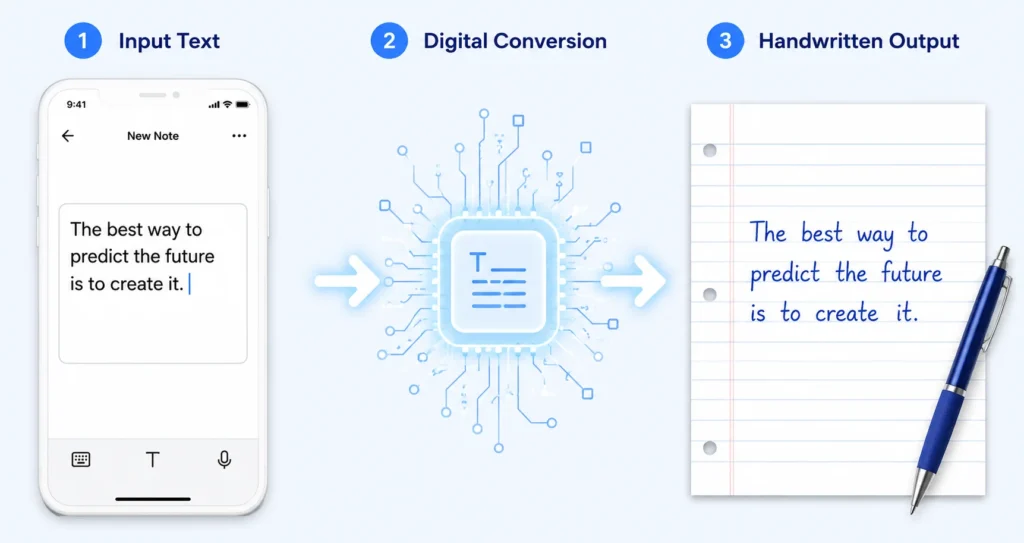
Step 1: You Enter Your Text
You type or paste your content into the tool. It can be short or long, a single sentence or a full 10-page essay. The tool accepts it all.
Step 2: The Tool Loads a Handwriting Style (Font)
The tool uses special handwriting-style fonts. These fonts are designed to look like real human writing. They are built from actual handwriting samples, sometimes from real people who traced their own writing to create a digital version. Each letter in these fonts has a natural shape with small curves, tilts, and irregularities.
Step 3: Randomization and Natural Variation
This is the secret that makes the result look realistic. Real human handwriting is never perfect. Every time a person writes the letter “a”, it looks slightly different. Good handwriting converters copy this behaviour. They slightly change the size, angle, spacing, and stroke weight of letters so no two letters look exactly identical. This is called randomisation, and it is what separates a believable handwriting result from a fake-looking one.
Step 4: Paper and Layout Rendering
The tool places your converted writing onto a virtual paper background. You can usually choose the type of paper — ruled lines, plain white, graph paper, or notebook-style. The tool makes sure the letters sit on the lines naturally, with proper margins and spacing, just like real writing on a real page.
Step 5: You Get a Downloadable Image or PDF
After rendering, the tool gives you a high-resolution image or PDF of your handwritten pages. You can save it, print it, or share it wherever you need.
The Difference Between a Handwriting Font and a Handwriting Generator
This is probably the most important thing to understand, and it is something almost no other guide explains well.
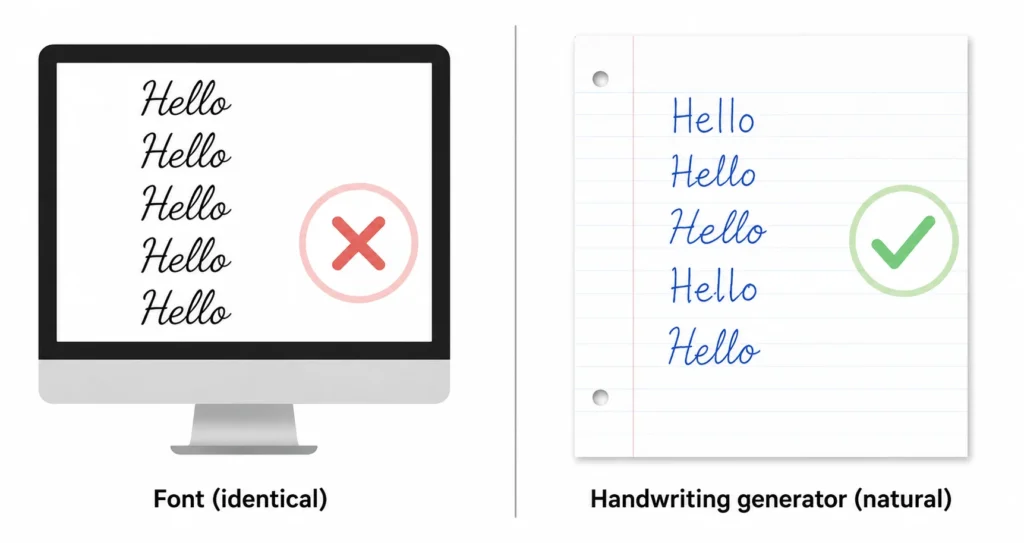
Many people think: “Why not just use a handwriting font in Microsoft Word?” Good question. But there is a big difference.
| Feature | Handwriting Font (e.g., in Word) | Handwriting Generator (like text-to-handwriting.com) |
| Every letter looks identical | Yes, same shape always | No, each letter varies naturally |
| Looks like real handwriting | No, looks like a styled font | Yes, feels genuinely human |
| Includes paper background | No, just text on screen | Yes, lined, plain, notebook, etc. |
| Adds natural pen wobble/tilt | No | Yes, built-in realism effects |
| Downloadable as handwritten page | No, it is just formatted text | Yes, high-res image or PDF |
| Can be printed as an assignment | No, it looks typed | Yes, looks like you wrote it |
The key takeaway: a font is just a style applied to your text. A handwriting generator actually recreates the experience of writing, complete with paper, variation, natural imperfections, and a printable result.
What Is Digital Handwriting?
Digital handwriting is any handwriting that exists in digital form, either created on a device or converted from typed text into a handwritten style using software.
There are two main types of digital handwriting:
- Writing with a stylus on a touchscreen tablet (like drawing with a digital pen)
- Converting typed text into handwriting using a tool like text-to-handwriting.com
Text to handwriting tools fall into the second type. They give you digital handwriting without needing a tablet, stylus, or any drawing skill. You just type and convert.
What Is AI Handwriting Simulation?
You may have heard the term AI handwriting simulation. This sounds technical, but the idea is simple.
AI handwriting simulation means using artificial intelligence technology to make typed text look like authentic human handwriting. The AI studies patterns in real handwriting, how people angle their letters, how much ink pressure they apply, how wide they space words, and then applies these patterns when converting your text.
The result is not just a styled font. It is a simulation, meaning it copies the unpredictable, imperfect, wonderfully human nature of real handwriting.
Why does this matter? Because:
- A plain handwriting font looks identical every time. Every “e” is the same. Every “o” is the same. A real person’s handwriting is never this uniform.
- AI simulation adds tiny random differences to each letter, slight rotation, minor size changes, subtle spacing shifts. This is what makes the output look genuinely human-written, not computer-generated.
Modern tools like text-to-handwriting.com use this principle to create outputs that are hard to distinguish from real handwriting at a glance.
Who Uses Text to Handwriting Tools?
The beauty of a text to handwriting tool is that it serves a surprisingly wide range of people. Here are the most common users:
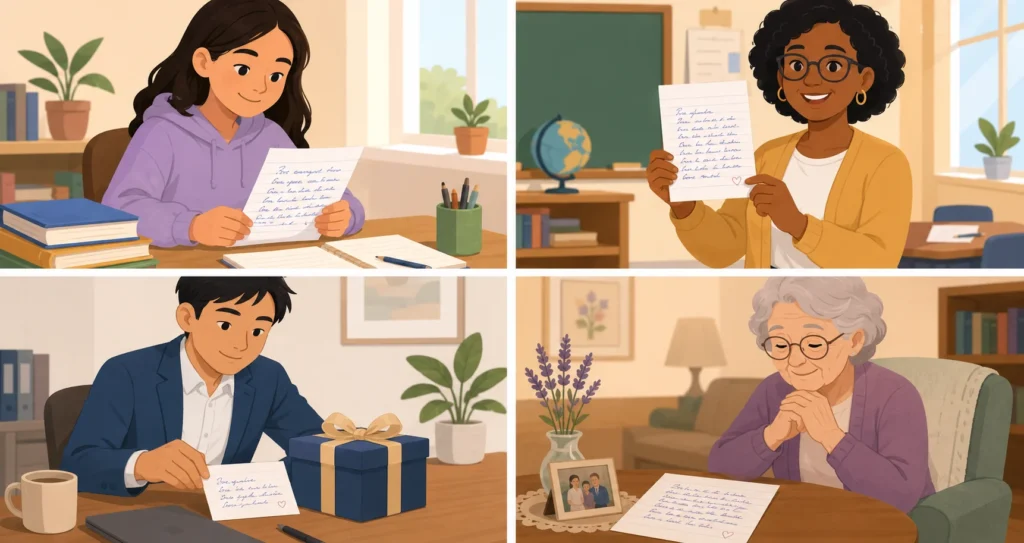
Students
Students who type faster than they write use these tools to produce clean handwritten assignments without spending hours with a pen. It saves time and energy, especially during exam season when there are multiple submissions to handle.
People With Medical Conditions
People with arthritis, hand tremors, carpal tunnel syndrome, or other conditions that make holding a pen painful or difficult can use these tools to produce handwritten-looking pages without any physical strain. This is genuinely life-changing for many users.
Teachers and Educators
Teachers use handwriting generators to create worksheets, sample notes, and assignment templates that feel personal and engaging, rather than cold and machine-printed.
Professionals and Business People
A handwritten thank-you note to a client feels warmer than a typed email. Businesses and professionals use handwriting generators to create personal-looking letters, notes, and cards that stand out and feel genuine.
Creative People and Writers
Bloggers, social media creators, scrapbook enthusiasts, and writers use handwriting tools to create visually appealing content, quotes, journal pages, poems, with a personal, warm aesthetic that typed text simply cannot achieve.
Anyone Who Values the Personal Touch
Handwriting communicates care. When someone receives a handwritten message, even a digitally-generated one, it feels more personal than typed text. This emotional value is something no regular font can replicate.
Why Does Handwriting Feel More Personal Than Typed Text?
This is a question many people wonder about. Why does seeing something handwritten trigger a different emotional response than seeing the same words typed?
The answer comes down to human psychology and nostalgia.
- Handwriting is effort: When someone writes by hand, we sense the time and effort they gave us. That effort creates emotional value.
- Handwriting is unique: No two people write exactly alike. Seeing handwriting feels like seeing a piece of that person.
- Handwriting is nostalgic: It reminds us of school notebooks, letters from grandparents, birthday cards from friends. These memories create warm, positive feelings.
- Handwriting feels real: In a digital world full of screens and keyboards, anything handwritten feels grounded, tangible, and human.
Text to handwriting tools capture this emotional quality. Even when the handwriting is digitally generated, it still triggers these feelings, because the brain responds to the visual appearance, not the process behind it.
What Features Should a Good Text to Handwriting Tool Have?
Now that you understand what text to handwriting is, here is what to look for when choosing a tool to use:
- Multiple Handwriting Styles: Different people write differently. A good tool should offer multiple handwriting options — neat, messy, cursive, print, school-style, so you can pick the one that matches your needs.
- Natural-Looking Letter Variation: As explained earlier, real handwriting varies. The best tools add randomness to each letter so the result looks genuine, not like a repeating font.
- Paper Style Options: You should be able to choose between ruled paper, blank paper, graph paper, and notebook-style backgrounds. This makes the output look complete and realistic.
- Ink Color Choices: Blue, black, and red are the three most common ink colours in real writing. A quality tool offers all three at minimum.
- Long Text Support: The tool should handle full essays, multi-page documents, and large volumes of text without breaking or cutting off content.
- Downloadable as Image or PDF: The output must be downloadable in a useful format. PNG or JPG for images. PDF for multi-page documents.
- Works on Any Device: A good tool runs in the browser and works on phones, tablets, and computers without any app download needed.
- Free to Use (at least the basics): Most quality tools offer the core functionality for free. Look for tools that do not require you to create an account just to convert basic text.
Common Questions About Text to Handwriting
Is text to handwriting the same as a font?
No. A font is a style applied to typed text in a word processor. A handwriting generator creates a completely separate image or document that looks handwritten, with paper, natural variation, and realistic imperfections. They are very different things.
Does the tool actually use AI?
Many modern tools use AI or algorithm-based techniques to add realism. They use smart randomization to vary letter shapes, spacing, and angles, mimicking how a real person writes. Some older tools use basic fonts without this variation, which makes the result look less realistic.
Is text to handwriting cheating?
This depends entirely on context. Using a handwriting tool for personal letters, creative projects, or non-academic purposes is completely fine. For school assignments, it is your responsibility to check your institution’s policies. The tool itself is neutral, like any other writing tool.
Can I use my own handwriting style?
Some advanced tools allow you to upload your own handwriting as a custom font. You trace your letters on a template, upload it, and the tool uses your personal writing style. This is a more advanced feature not available in all tools.
Does it work for languages other than English?
Better tools support multiple scripts including Arabic, Hindi (Devanagari), Cyrillic, and Latin alphabets. Always check the language support before using a tool for non-English content.
What is the best use case for text to handwriting?
The most popular use is creating handwritten assignment pages. But it is also excellent for personal letters, creative journal pages, printable notes, social media graphics, greeting cards, and any situation where handwriting creates a stronger emotional connection than typed text.
A Brief History: How Text to Handwriting Tools Evolved
The idea of converting typed text into handwriting is not brand new, but the quality of the tools has improved dramatically.
Early Stage – Simple Fonts (2000s)
The first attempts were simply handwriting-style fonts installed in word processors. You could type in “fonts that look like handwriting” but every letter was identical, which immediately revealed it was not real handwriting.
Second Stage – Browser-Based Generators (2010s)
Developers began building online tools that placed handwriting fonts on virtual paper backgrounds. You could download the result as an image. This was a major step forward, but the results still looked somewhat uniform and artificial.
Third Stage – Randomization and Realism (Late 2010s – 2020s)
Smarter tools began adding letter variation. Each character would be slightly different from the last. Paper textures improved. Ink effects were added. The outputs started fooling the eye.
Current Stage – AI-Enhanced Simulation (Now)
Today’s best tools use machine learning and sophisticated algorithms to produce output that is genuinely difficult to distinguish from real handwriting. Multiple scripts are supported. Custom fonts are possible. The tools work on all devices and produce high-resolution, printable results in seconds.
The Psychology Behind Why We Trust Handwriting More
Here is something fascinating that most text to handwriting guides never mention: there is real science behind why we respond differently to handwritten content.
Studies in communication psychology show that people perceive handwritten messages as more sincere, more personal, and more effortful than typed ones. A handwritten thank-you note after a job interview is seen as a stronger gesture than an email, even if both say the exact same words.
This has practical implications for many situations:
- Marketing: A handwritten element in a sales letter increases open rates and response rates.
- Education: Handwritten study notes are processed differently by the brain than typed notes, supporting memory retention.
- Personal relationships: A handwritten birthday message feels more emotionally significant than a digital one.
- Business communication: A personal note attached to a product shipment makes customers feel valued.
Text to handwriting tools let you tap into all of these psychological benefits, without needing to slow down and write everything by hand.
Quick Summary: Everything You Need to Know
Here is a simple one-table recap of all the key ideas covered in this guide:
| Concept | What It Means |
| Text to handwriting | Converting typed text into content that looks written by hand |
| Handwriting converter | An online tool that performs the text-to-handwriting conversion |
| Digital handwriting | Handwriting that exists in digital form, either drawn or generated |
| AI handwriting simulation | Using AI to add natural variation to letters so the result looks genuinely human |
| Difference from fonts | A font applies a style to text; a generator creates a new handwritten image with paper and variation |
| Key users | Students, professionals, people with hand conditions, teachers, creatives |
| Main output | Downloadable PNG, JPG, or PDF that looks like a real handwritten page |
| Why it matters | Handwriting triggers emotional responses that typed text cannot, warmth, trust, and personal connection |
Conclusion
Text to handwriting is a simple concept with a powerful application. You type your words. A smart tool converts them into realistic handwriting on a virtual page. You download the result and use it however you need.
It is not the same as a handwriting font. It is not just about looks. It is about giving your words the warmth, personality, and emotional weight that only handwriting can provide, without the physical act of writing.
Whether you are a student with a deadline, a professional sending a personal note, a teacher creating engaging materials, or simply someone who values the human touch in their messages, text to handwriting tools exist for you.
Ready to try it yourself? Visit text-to-handwriting.com and convert your first piece of text into handwriting in under one minute, free, no account needed.